Educator Tools 2.2: Let Your Students Shine
We're back with another update to Educator Tools, and this one's all about student expression, teacher control, and keeping the feedback loop alive.
6 min. read
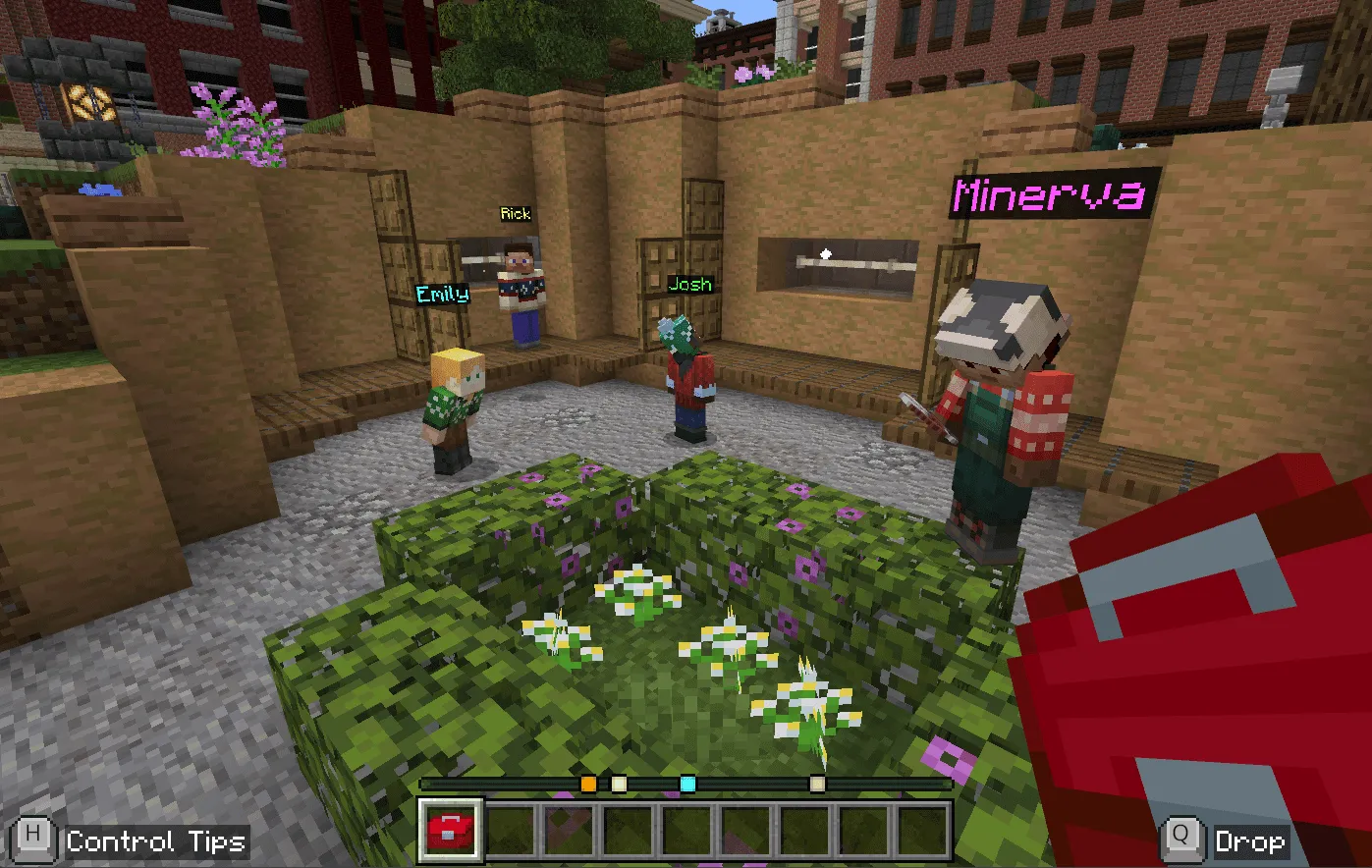
🎨 Custom Nicknames Are Here!
Say goodbye to "Student153" and hello to actual names! With Educator Tools 2.2, students can now set their own custom nicknames and pick their favorite color to display above their heads in-game.
We know what you're thinking: "This sounds like a moderation nightmare."
But don't worry! Teachers get full approval rights over student nicknames before they go live. And if you'd rather keep things simple?
You can disable the feature entirely. (Though we think the world's a bit more colorful when students can express themselves.)
💬 We Want Your Feedback
You've been using Educator Tools in classrooms around the world, and we'd love to know how to make it even better. That's why we've added a feedback prompt directly in-game. We'll ask you to share your thoughts at just the right moments, pinky promise we won't be too annoying about it.
Want to share feedback right away? Fill out our survey here.
🐛 Bug Fixes
We also squashed some pesky bugs with Classroom Limitations and the Elytra. Turns out, they weren't working as expected. They are now!
📦 Download Educator Tools 2.2
Ready to try it out? Grab the latest version here:
🔗 https://github.com/ShapescapeMC/Educator-Tools/releases/latest